Oracle just released its newest version of Oracle Data Access Components (ODAC) that incudes support for Entity Framework 4.0. You can read more about this release here http://www.oracle.com/technetwork/topics/dotnet/whatsnew/index.html. You can also read this article about usage of ODP (Oracle Data Provider) with Entity Framework models http://www.oracle.com/technetwork/issue-archive/2011/11-sep/o51odt-453447.html
One important note is that Code First is not officially supported in this release, and will be supported in a future release. Having said that, I wanted to see if I can use it, since Code First builds on top of EF 4, which is supported by this release. I was able to confirm that I can indeed access Oracle data and update it.
Here are step-by-step instructions.
You will need one prerequisite – Oracle engine itself. I used 11g Express edition, which is free for developer. You can download it from this page
http://www.oracle.com/technetwork/database/express-edition/downloads/index.html
Event those it is not required, I also installed Sql Developer, which is akin to SQL Server Management Studio, well mostly anyway. You can download it from this page
http://www.oracle.com/technetwork/developer-tools/sql-developer/downloads/index.html
Once that is done, download and install ODAC from here
http://www.oracle.com/technetwork/topics/dotnet/whatsnew/index.html
At this point, I ran SQL Developer, connected to my instance and looked at the existing database. You have to create a new connection for that, using File – New..->Database Connection menu. Under Other Users node I found HR, which contains a sample HR database.
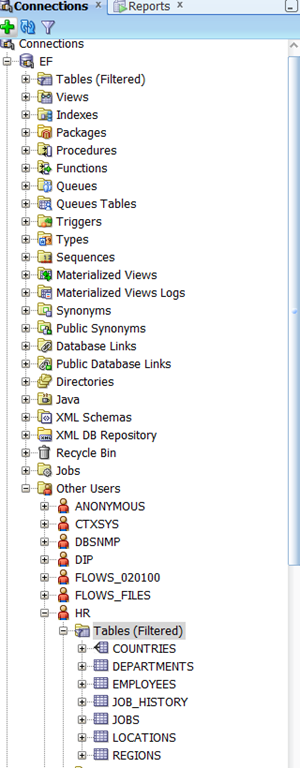
Personally, I reset password for HR user to something that I know. This way I do not have to use SYS login.
Now that those tasks are out of the way, you are ready to get started. I assume you already have VS 2010 installed.
Now, start new project (I used Console application) and install Entity Framework Code First package reference into this project. You can use NuGet for that, which is what I did. Also add a reference to Oracle ODP assembly – Oracle.DataAccess. Then, I create a POCO class to match Countries table and setup DbContext. I use fluent API to configure that table. I just do it in the context class instead of creating a separate configuring class. Here is my country class.
public class Country
{
public string CountryID { get; set; }
public string CountryName { get; set; }
public decimal RegionID { get; set; }
}
And here is DbContext class:
public class Context : DbContext
{
public Context()
: base(new OracleConnection(ConfigurationManager.ConnectionStrings["OracleHR"].ConnectionString), true)
{
}
public DbSet<Country> Countries { get; set; }
protected override void OnModelCreating(DbModelBuilder modelBuilder)
{
base.OnModelCreating(modelBuilder);
modelBuilder.Conventions.Remove<IncludeMetadataConvention>();
modelBuilder.Entity<Country>().Property(p => p.CountryID).HasColumnName("COUNTRY_ID");
modelBuilder.Entity<Country>().HasKey(p => p.CountryID);
modelBuilder.Entity<Country>().Property(p => p.CountryName).HasColumnName("COUNTRY_NAME");
modelBuilder.Entity<Country>().Property(p => p.RegionID).HasColumnName("REGION_ID");
modelBuilder.Entity<Country>().ToTable("COUNTRIES", "HR");
}
}
Now, you have to setup connection string in app.config:
<?xml version="1.0"?>
<configuration>
<connectionStrings>
<add name="OracleHR"
connectionString="DATA SOURCE=localhost:1521/XE;PASSWORD=****;PERSIST SECURITY INFO=True;USER ID=HR;"
providerName="Oracle.DataAccess.Client" />
</connectionStrings>
<startup>
<supportedRuntime version="v4.0" sku=".NETFramework,Version=v4.0" />
</startup>
</configuration>
Here is the code that gets data from the table and inserts a new row.
using (var ctx = new Context())
{
var data = ctx.Countries.ToList();
ctx.Countries.Add(new Country() { CountryID = "CL", CountryName = "Chile", RegionID = 2 });
ctx.SaveChanges();
}
Here are a few important points.
- Make sure to put correct password into connection string.
- I configure column names explicitly to match the database table.
- I had to use correct .NET types to match the Oracle data types. Here is MSDN article that describes this mapping http://msdn.microsoft.com/en-us/library/yk72thhd.aspx
- I am manually creating Oracle Connection and passing it into constructor of my context class. I tried to avoid that, but I kept getting exceptions. This approach worked perfectly.
In summary, one apparently can use newest Oracle provider to use with Code First. This approach is not officially supported by Oracle, at least not yet. So, use it at your own risk. You definitely cannot create new database as you can in SQL Server, so you have to maintain database separately. From my research, only DevArt provides full Code First support for Oracle with their own provider, at least according to their product page http://www.devart.com/dotconnect/entityframework.html
You can download my sample solution http://DotNetSpeak.com/Downloads/EFOracle.zip
[Update 2/12/2012] – this scenario is not officially supported by Oracle, so you should not use this in production.
Thanks, and feedback is appreciated.